Ultra Librarian Alternative: Neurocad vs Ultra Librarian
Ultra Librarian and Neurocad™ help engineers get component information into CAD, but they begin from different starting points.
Ultra Librarian is a PCB CAD library. Engineers search for component CAD models that have already been created, then download an available schematic symbol, PCB footprint, 3D model, or related design resource.
Neurocad™ generates an engineering artifact from the source information supplied by the user. It reads sources such as datasheets, package drawings, images, tables, manufacturing data, and existing CAD files, then constructs a native, editable artifact for a supported CAD application.
The practical difference is:
- Ultra Librarian helps you find an existing component CAD model.
- Neurocad™ creates the artifact when the engineering source exists but the usable CAD asset does not.
Neurocad™ can serve as an Ultra Librarian alternative when catalog lookup does not produce the part, package, format, or editable result the engineer needs. It does not require teams to stop using component libraries that already work for them.
What is Ultra Librarian?
Ultra Librarian is an electronic component library used to search for and download prebuilt CAD assets. Depending on the available component content, engineers may find:
- Schematic symbols
- PCB footprints
- 3D models
- Component documentation
- Reference designs
- Files for multiple CAD formats
This library model is useful when the required component is already available, the package and part number match the manufacturer’s documentation, and the downloaded asset supports the engineer’s CAD and library requirements.
What is Neurocad™?
Neurocad™ is an intent compiler for physical engineering. It interprets engineering sources, decomposes the relevant information into structured specifications, and uses those specifications to construct artifacts for supported CAD applications.
Neurocad™ currently creates:
- Schematic symbols
- PCB footprints
- 3D component models
Schematics, bills of materials, PCB layouts, and mechanical parts are in beta testing.
Neurocad™ does not maintain a component catalog. The source material supplied by the user becomes the starting point for generation.
Neurocad™ compared with Ultra Librarian
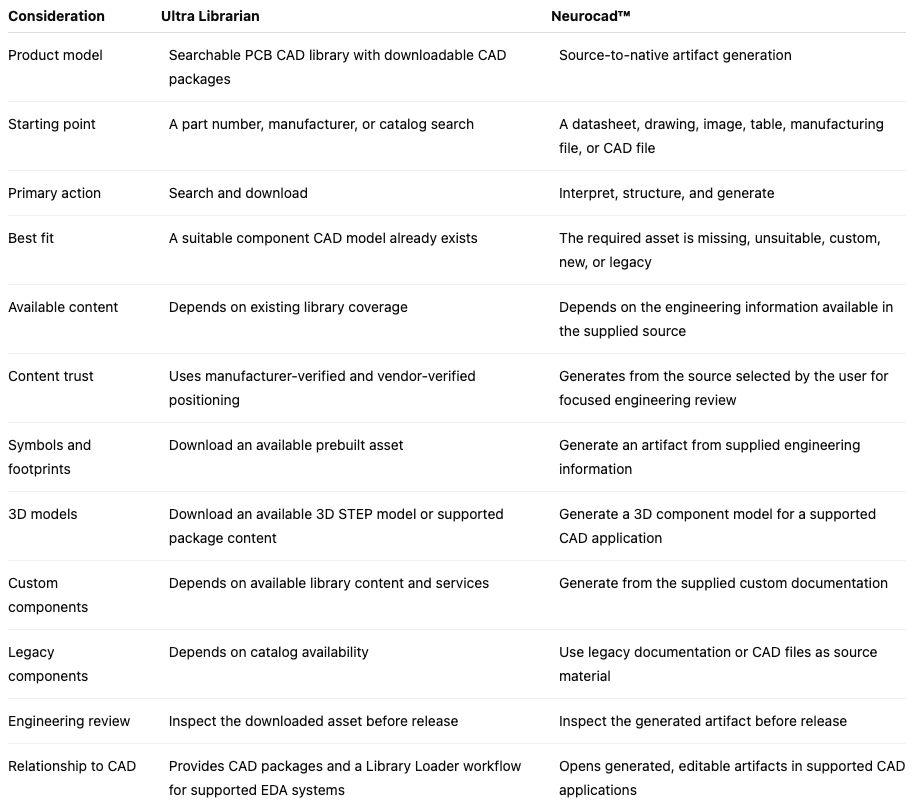
When should you use Ultra Librarian?
Use Ultra Librarian when:
- The correct component is already available in its PCB CAD library
- The symbol, footprint, or 3D model matches the manufacturer’s documentation
- The available CAD format supports your engineering environment
- The asset meets your organization’s library standards
- Downloading an existing model provides the shortest path into the design
Searching an established electronic component library should remain part of a practical component-selection workflow. If the correct asset already exists and passes review, there is no reason to recreate it.
When should you use Neurocad™ as an Ultra Librarian alternative?
Use Neurocad™ when:
- The component is not available in the library
- A newly released part does not yet have usable CAD content
- You need a custom or proprietary component
- The available model does not match the required package or manufacturer documentation
- You need to generate a symbol or PCB footprint from a particular datasheet
- You are rebuilding a legacy component from archived documentation or CAD files
- You need a native, editable artifact for a supported CAD application
- You want to automate repeated PCB library creation workflows
- You need to work from engineering sources beyond a component datasheet
Catalog availability does not have to determine whether engineering can proceed. If the design information exists, Neurocad™ can use that information as the basis for artifact generation.
Search first. Generate when needed.
Ultra Librarian and Neurocad™ can participate in the same engineering workflow:
- Search Ultra Librarian or another approved PCB CAD library for the required component.
- Confirm the part number, package, pin mapping, dimensions, and available CAD format.
- Review and use the existing asset if it meets the project’s requirements.
- If the required asset is missing or unsuitable, collect the manufacturer’s datasheet, package drawing, or other available source information.
- Add the source to Neurocad™ and select the relevant symbol, pinout, footprint, or package information.
- Describe the artifact you need and generate the result.
- Review the generated artifact against the manufacturer’s source and your organization’s standards.
- Open the artifact in the selected CAD application.
This workflow preserves the speed of library lookup without making the catalog the limit of component coverage.
PCB CAD library content and native generation are not the same
The phrase “CAD format” can describe several kinds of deliverables. A downloaded component model may be provided in a native tool format, an exchange format, or another representation supported by the library and part record.
Neurocad™ uses the engineering source to construct the result for the selected CAD application. The objective is not simply to move visible geometry between file formats. It is to materialize the extracted specifications as an editable engineering artifact that can continue through the intended CAD workflow.
Neurocad™ currently supports opening artifacts in:
- Altium
- KiCad
- OrCAD
- Mentor
- Autodesk Fusion
- SOLIDWORKS
More than a datasheet-to-part generator
Generating library parts is one current Neurocad™ workflow, but it is not the boundary of the platform.
Neurocad™ supports engineering sources including:
- PDF, Excel, and CSV
- JPG, PNG, and SVG
- BSDL and SPICE
- ODB++ and IPC-2581
- DXF, STEP, and IGES
- Native and legacy CAD files
These inputs may contain component data, schematics, reference designs, bills of materials, PCB design data, mechanical drawings, manufacturing information, simulation data, or legacy design information.
The broader Neurocad™ workflow moves engineering information from source material into usable CAD artifacts without requiring an engineer to manually reconstruct the same information at every boundary.
Accuracy, standards, and review
Downloaded and generated component CAD models should both be inspected before they enter an approved library or production design.
Every PCB footprint generated by Neurocad™ follows IPC-7351 standards. Engineers should still review the footprint against the manufacturer’s package drawing and their organization’s requirements. This includes:
- Pad geometry and dimensions
- Pin numbering and pin 1 orientation
- Courtyard boundaries
- Solder-mask and paste information
- Package variants
- Symbol-to-footprint relationships
When a document contains several packages or competing footprint drawings, users can capture the exact image or table Neurocad™ should use. A focused capture and specific prompt can improve accuracy by removing unrelated information from the generation request.
Frequently asked questions
Is Neurocad™ an Ultra Librarian alternative?
Yes, when the goal is to create a CAD artifact that is missing or unsuitable in a component library. Ultra Librarian helps engineers search for existing component CAD models. Neurocad™ generates an artifact from supplied engineering source information.
Does Neurocad™ replace Ultra Librarian?
Not necessarily. Use Ultra Librarian when the correct prebuilt asset is available and meets your requirements. Use Neurocad™ when the required asset must be generated from a datasheet, drawing, manufacturing file, or existing design file.
Which is better, Neurocad™ or Ultra Librarian?
The better option depends on the task. Ultra Librarian may provide the shortest path to a suitable component that already exists in its catalog. Neurocad™ is designed for situations where the usable CAD asset does not exist, does not meet the requirement, or must be created from a specific engineering source.
Does Neurocad™ have a searchable component library?
No. Neurocad™ does not maintain a catalog of prebuilt component models. It generates artifacts from the source information supplied by the user.
Can Neurocad™ generate a PCB footprint from a datasheet?
Yes. Add the datasheet, allow Neurocad™ to read the complete file or capture the relevant package drawing, describe the required footprint, and generate the artifact. Review the result against the manufacturer’s documentation before release.
Can Neurocad™ generate schematic symbols and 3D models?
Yes. Neurocad™ currently creates schematic symbols, PCB footprints, and 3D component models.
Are Neurocad™ footprints IPC-7351 compliant?
Yes. Every PCB footprint generated by Neurocad™ follows IPC-7351 standards. Engineers should still review the finished artifact against the manufacturer’s package drawing and their organization’s library rules.
Do engineers still need to inspect Neurocad™ results?
Yes. Neurocad™ replaces repetitive transcription with focused engineering review. Users should inspect pin mapping, dimensions, geometry, package selection, and organizational requirements before approving the artifact.
When the component CAD model does not exist, generate it
Ultra Librarian provides access to existing PCB CAD library content. Neurocad™ creates native, editable artifacts from engineering sources when the required component model is unavailable or unsuitable.
Keep using the component libraries that already save your team time. When the catalog stops, start from the source.
Last updated August 21, 2026