Engineering content to native CAD
Neurocadturnsyourdocumentationintotool-readydesigndata
For Altium · KiCad · OrCAD · Siemens EDA · SOLIDWORKS · Autodesk
The design problem begins before CAD starts.
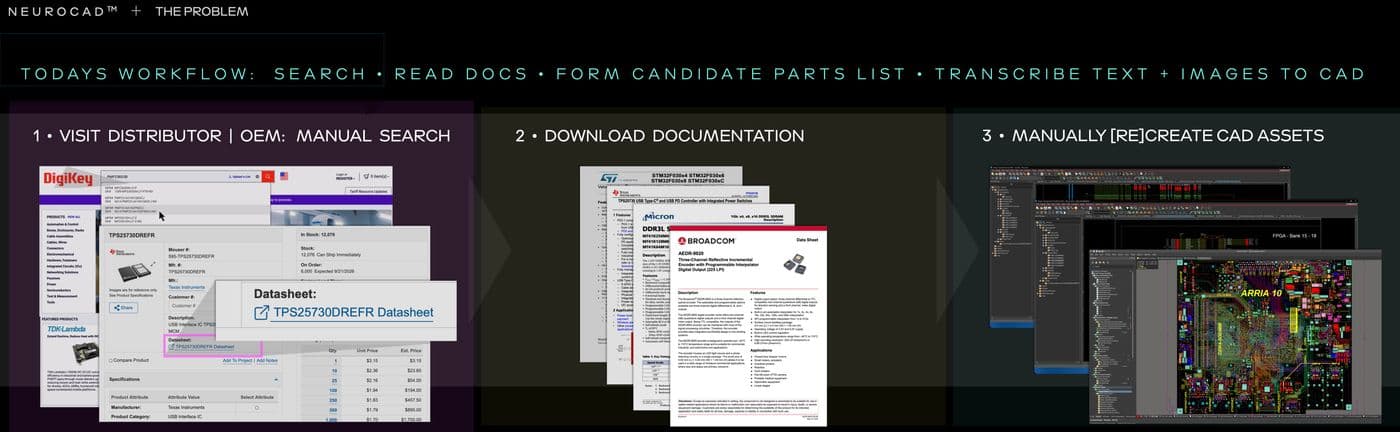
Neurocad™ reads datasheets, drawings, reference designs, images, tables, and existing engineering files.
Neurocad turns relevant information into native, editable symbols, footprints, 3D models, schematics, PCB boards, and connected design workflows for the CAD tools engineers already use.
Bring a part you would build by hand
Try out Neurocad with a real component, datasheet, package drawing, reference design, or engineering source your team would normally have to reconstruct. See what Neurocad finds. Review what it builds. Decide whether you would use it.
Who it's for
Electrical Engineers & PCB Designers
Professionals who build circuit boards and need to turn manufacturer datasheets, PDFs, and pinout diagrams into native schematic symbols, PCB footprints, and simulation models you can inspect, edit, and trust before use.
Mechanical engineers
Professionals who design physical products, housings, and assemblies and need parametric 3D models and native CAD components you can inspect, edit, and trust before use.
Hardware and NPI Teams
Cross-functional teams working across ECAD and MCAD who need trusted, editable assets to move cleanly across tools and disciplines.
Field application engineers
Turn reference content and customer source material into usable CAD without routing requests through other internal teams.
Product and Product Marketing Engineers
Extend product documentation into engineering assets customers can use in their designs.
Distributors
Close the gap between finding a part, downloading its content, and getting that part into the customer’s engineering workflow.
How it works
Neurocad interprets. You verify. The kernel executes.
Add the source
Use a document, image, table, electronic-design file, mechanical file, manufacturing file, or native or legacy CAD source.
Describe what you need
Ask Neurocad to create a symbol, footprint, 3D component model, schematic, PCB board, or BOM. Neurocad applies engineering standards such as IPC-7351 to PCB land-pattern generation and uses the same structured source information to support electrical, mechanical, simulation, and other downstream design assets.
Review the results
Inspect the extracted information, assumptions, dimensions, pins, mappings, geometry, and source references that drive the result. Choose the best candidates and/or make revisions.
Open in your CAD tool
Use Neurocad Link to open the artifact in the selected supported CAD application. Continue editing and reviewing it in the environment your team already uses.
Try it out yourself
Try out Neurocad with a real component, datasheet, package drawing, reference design, or engineering source your team would normally have to reconstruct. See what Neurocad finds. Review what it builds. Decide whether you would use it.
Request a demo
Show us what slows you down. Bring a component your team keeps fielding requests for, or the package your FAEs are tired of explaining isn't ready. We'll run it through Neurocad with you and show you exactly what closes the gap.
Get Neurocad news
Join our newsletter for release updates and industry articles. We will not spam you. Promise.
Thanks — we'll be in touch.
FAQ
Frequently asked questions
What can Neurocad create?
Neurocad creates native, editable schematic symbols, PCB footprints, 3D component models, schematics, PCB boards, and BOM workflows for supported engineering environments. Available outputs and destination applications can vary by artifact type.
Do engineers review the result?
Yes. Engineers review generated artifacts against the source information and their organization's engineering and library requirements before release.
How does Neurocad determine what to build?
Neurocad interprets the source and structures the relevant information as an engineering specification. A deterministic generation pipeline uses that specification to construct the requested artifact.
Is the output native and editable?
Yes. Neurocad constructs the result for the supported destination application so engineers can continue editing it in their established CAD environment.
How does Neurocad work with existing CAD and library systems?
Neurocad creates native engineering assets upstream of the CAD environment. Existing CAD, PLM, PDM, version-control, and library-management systems continue governing the design data and release process.
How is Neurocad different from component libraries?
Component libraries distribute assets that have already been created. Neurocad constructs an asset from the engineering source supplied for the task. Teams can use both approaches depending on whether a suitable existing asset is available.
Which file types can Neurocad read?
Supported inputs include PDF, JPG, PNG, SVG, BSDL, SPICE, ODB++, Excel, CSV, DXF, STEP, IGES, IPC-2581, reference designs, and supported native or legacy CAD files.
Does Neurocad choose the final PCB route?
Neurocad can generate several routing candidates from the PCB and the selected routing priorities. The engineer or FAE compares the candidates and chooses which result to keep. Routing is an optional process applied after PCB creation.
What do I need to open a result in CAD?
Use a Neurocad account, a supported source, the applicable supported CAD application, and Neurocad Link for the desktop handoff.