From source content to native CAD
Engineeringforthemomentyousay,“Icanusethis.”
Use in Altium · KiCad · OrCAD · Siemens EDA · SOLIDWORKS · Autodesk
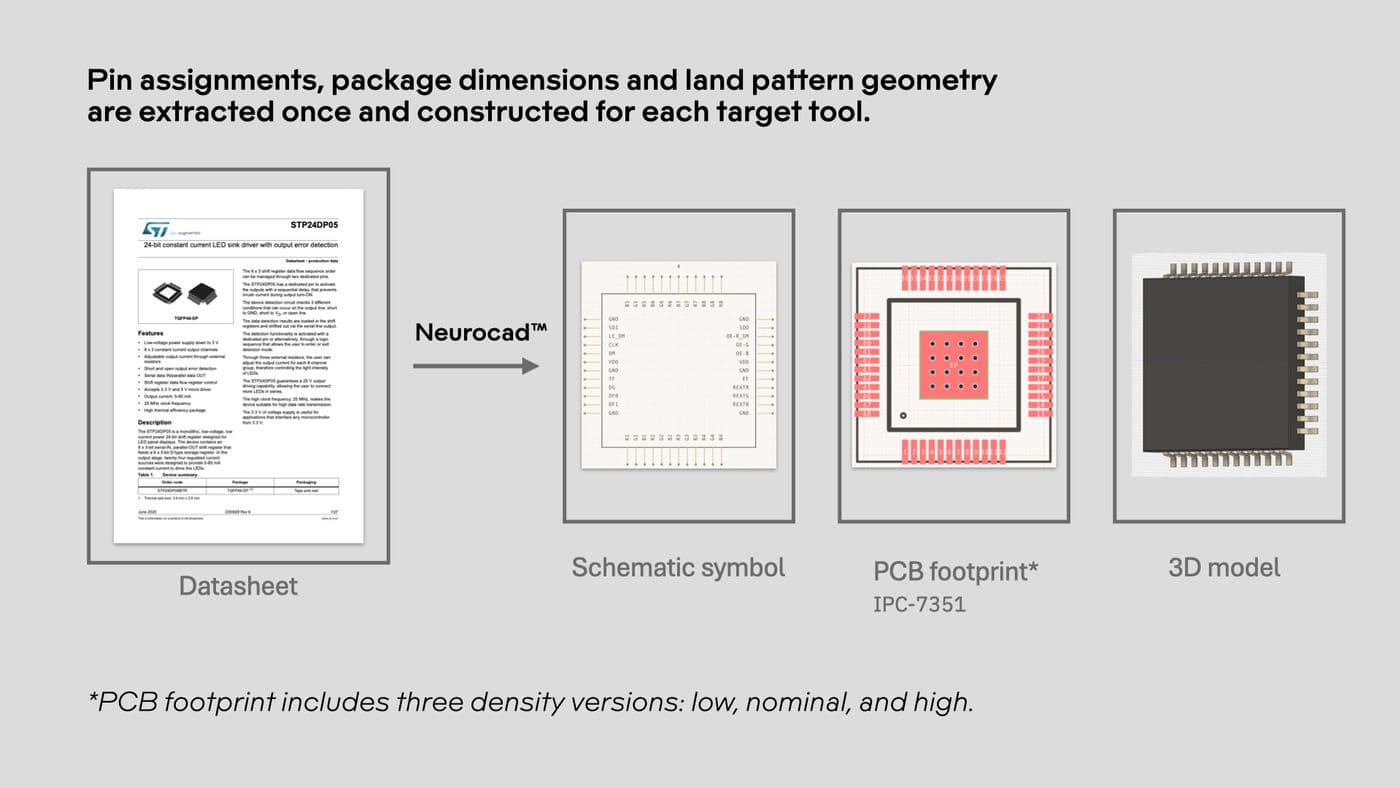
Start with one datasheet. Generate native artifacts. Send to your existing CAD tools.
One source document becomes three native artifacts.
How it works
Add source material
A datasheet, package drawing, pinout table, image, reference design, or existing engineering file.
Describe what you need
Name the package or pin count where the source leaves room for doubt. Neurocad applies engineering standards such as IPC-7351 to PCB land-pattern generation and uses the same structured source information to support electrical, mechanical, simulation, and other downstream design assets.
Review the results
Inspect pin numbering, pin 1 orientation, names, and geometry against the manufacturer's own source before it goes anywhere. And edit in Neurocad if necessary.
Open in your CAD tool
The artifact opens as a native, editable part in Altium, KiCad, OrCAD, Siemens EDA, SOLIDWORKS, and Autodesk.
Neurocad does not replace CAD.
It eliminates the manual interpretation, reconstruction, and re-entry required to move engineering information into CAD.
Not a file converter
A converter translates formats. Neurocad interprets engineering source material, creates a structured engineering specification, and constructs an artifact for the target CAD environment.
Not a parts library
A library gives you an asset someone has already created. Neurocad starts with your source information, including new, custom, legacy, and incompletely supported parts.
Not a CAD replacement
Your CAD tools remain your CAD tools. Your PLM, PDM, version control, and library-management systems continue to govern your engineering data.
Bring a part you would build by hand
Try out Neurocad with a real component, datasheet, package drawing, reference design, or engineering source your team would normally have to reconstruct. See what Neurocad finds. Review what it builds. Decide whether you would use it.
Who it's for
Electrical Engineers & PCB Designers
Professionals who build circuit boards and need to turn manufacturer datasheets, PDFs, and pinout diagrams into native schematic symbols, PCB footprints, and simulation models.
Mechanical engineers
Professionals who design physical products, housings, and assemblies and need parametric 3D models and native CAD components.
Hardware and NPI Teams
Cross-functional engineering teams working across ECAD and MCAD environments such as Altium, Cadence, KiCad, and SolidWorks.
Where it works today





Why engineers choose Neurocad
Deterministic by design
Neurocad uses AI to interpret the source, then applies consistent engineering rules to construct the result.
IPC compliant
IPC-7351, manufacturer specifications, and your own library requirements are incorporated into the generation.
Native, editable assets
Cross-tool continuity works upstream of CAD, PLM, PDM, version control, and library-management systems, producing structured/native assets those systems can continue to govern.
Library consistency
The same structured process can apply naming, geometry, layers, package conventions, and other rules consistently across parts -- valuable for teams and individual engineers.
One source, multiple engineering outputs
The engineering information extracted once preserves the common engineering basis across all outputs.
Accuracy you can inspect
Neurocad improves the conditions for accuracy by extracting structured data, applying deterministic rules and standards, retaining source evidence, and making the result reviewable before release.
No manual redraws
Moves you through the before-CAD workflow faster, shifting time from reconstruction to engineering judgment.
Maintain existing CAD ecosystem
Native assets deliver to Altium, KiCad, Cadence, SolidWorks, Fusion, PLM/PDM/library workflows.
Show us what slows you down
Bring a component your team keeps fielding requests for, or the package your FAEs are tired of explaining isn't ready. We'll run it through Neurocad with you and show you exactly what closes the gap.
Neurocad™ reads
Documents
Datasheets Reference designs Application notes PDF drawings Excel and CSV
Images
JPG PNG SVG
Electronic design data
BSDL SPICE ODB++ IPC-2581
Mechanical and geometry data
DXF STEP IGES
Engineering and CAD data
Native CAD Legacy CAD Schematics BOM information PCB design data
Review before release
Trust comes from being able to check the work.
Pin assignments and naming
Pin 1 orientation
Package and body dimensions
Pitch and spacing
Footprint geometry
Mechanical geometry
Assumptions or ambiguous source information
Your own naming, layer, and library conventions
Neurocad™ exports
Schematic symbols
PCB footprints
3D component models
Schematics
PCB layouts
Bill of materials (coming soon)
Mechanical parts (coming soon)
Why Neurocad
Built for engineering use, not just asset generation.
Evidence before acceptance
Neurocad keeps the source and the result connected so engineers can review what was interpreted before accepting what gets built.
Native and editable
Results are constructed for the destination CAD environment rather than handed back as flattened geometry that cannot behave like a native part.
One source can serve multiple engineering needs
A common engineering source can drive electrical, mechanical, simulation, and other downstream design assets without requiring the same information to be reinterpreted at every boundary.
Deterministic construction
AI helps interpret irregular source material. Engineering rules construct the resulting geometry and artifact.
Works with the tools you already use
Neurocad works upstream of your existing CAD, PLM, PDM, version-control, and library-management environments rather than replacing them.
Standards-aware output
PCB land patterns can be constructed to applicable engineering standards such as IPC-7351 and reviewed against manufacturer documentation and your own library requirements.
Get started
Get Neurocad news
Join our newsletter for release updates and industry articles. We will not spam you. Promise.
Thanks — we'll be in touch.
FAQ
Frequently asked questions
Do I still need to check the artifacts Neurocad generates?
Yes. You should review generated engineering assets against the manufacturer source and your own engineering and library requirements before release.
Neurocad reduces repetitive reconstruction so engineers can spend their time on focused review.
How does Neurocad determine what to build?
Neurocad interprets engineering information from documents, drawings, images, tables, and other supported source material and structures what it finds into an engineering specification.
That specification is then used by a consistent generation pipeline to construct the target artifact.
Is the output native and editable?
Yes. Neurocad constructs tool-specific artifacts intended to behave as native, editable engineering assets in supported CAD environments.
Does Neurocad replace my CAD tools?
No. Neurocad works upstream of your existing CAD applications. Your CAD tools remain where engineering design and editing happen.
Is Neurocad a file converter?
No. File conversion translates one representation into another. Neurocad interprets source information, structures the engineering content inside it, and uses that information to construct a target artifact.
How is this different from SnapMagic, SamacSys, or Ultra Librarian?
Component libraries are often the fastest route to a part someone has already created.
Neurocad starts with source engineering information. It is useful when a component is new, custom, legacy, missing, incompletely covered, or needed in a CAD environment where the required asset does not already exist.
The approaches are complementary.
Does Neurocad replace PLM, PDM, or library management?
No. Those systems continue to govern and manage engineering data. Neurocad creates native engineering assets that can enter the workflows those systems already control.
Can I use proprietary or confidential documentation?
Neurocad is designed to work with proprietary engineering material. Organizations with specific security, privacy, compliance, network, or deployment requirements should review those requirements directly with Neurocad.
What file types can Neurocad read?
Supported sources include PDF, XLSX, CSV, JPG, PNG, SVG, BSDL, SPICE, ODB++, IPC-2581, DXF, STEP, IGES, and native or legacy CAD information. Coverage continues to expand.
How do I evaluate Neurocad?
You can start a free trial, or send the Neurocad team a real part or engineering source your team normally has to reconstruct and evaluate the result together.
Contact us for more information or request a demo below.