Give your part a better shot at the BOM
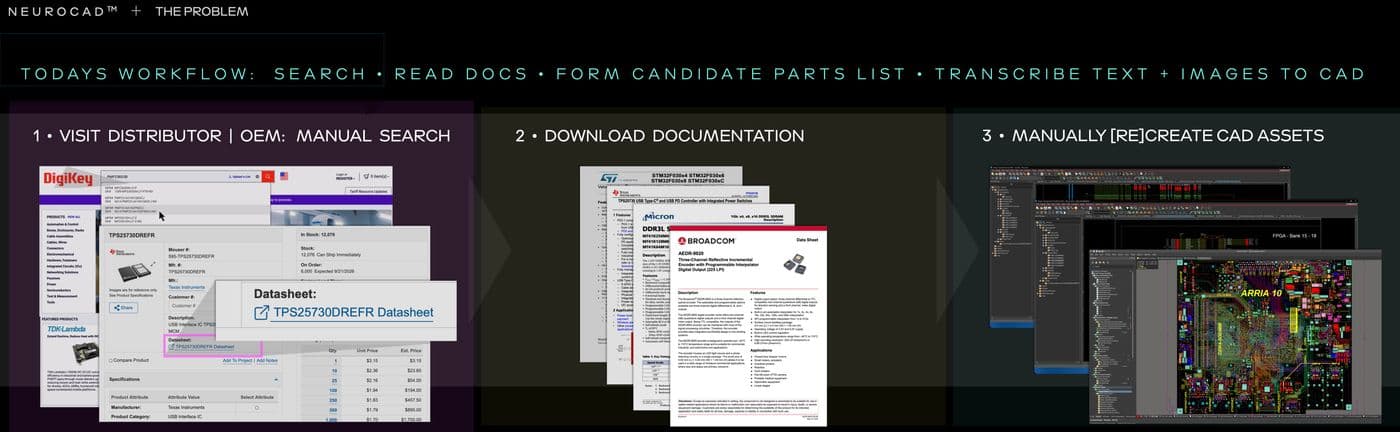
Neurocad reads your datasheets, smart PDFs, application notes, and reference designs, then builds native, editable schematics and PCB-board context in the CAD tool the customer already uses.
Why it matters
Customers evaluate and implement your parts using content you've already published. Neurocad turns that content into the executable engineering asset that moves the design forward, and gives FAEs the ability to produce a reviewed, native result directly from it, in the customer's own CAD tool.
What Neurocad does
- Published content to native schematic
Turn a circuit from a smart PDF or reference design into an editable schematic in the customer's CAD environment. Select just the relevant subcircuit or region and save it as a reusable design asset.
- Product documentation to complete part
Generate the symbol, footprint, and 3D model from your product source, including large-pin devices and pin-to-pad relationships.
- Reference design to PCB board
Carry a selected reference-design circuit into an editable PCB board. Generate routing candidates so the FAE can review and hand off the implementation that fits the customer's application.
- Structured, searchable content
Turn published information into structured engineering assets that FAEs and customers can search and reuse for the circuit, package, or design information they need.
Where it works today
Get started
Talk to Neurocad about semiconductor design-in